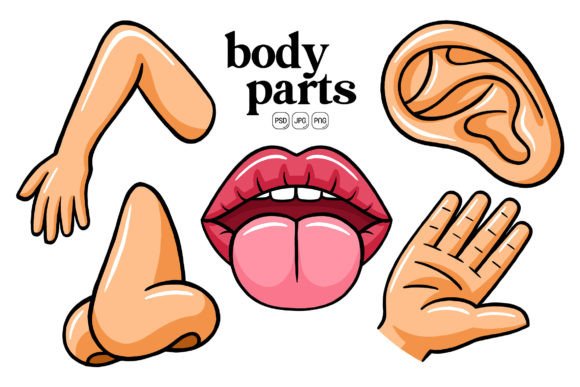
Body Parts Illustration Pack 01: Cute Character Art for Creative Projects
When ideas involve the human form, finding the right visuals often takes longer than expected. Generic icons can feel cold, while overly complex medical diagrams can intimidate an audience. Body Parts Illustration Pack 01 steps into that gap with a super cute character art style that makes eyes, hands, hearts, and other anatomical elements feel friendly rather than sterile. The pack includes 100 original illustrations built around a flat design approach, so the images stay clean and modern across dozens of possible uses.
The real value lives in how easily you can adapt each graphic. Because every shape inside the native Adobe Photoshop file is separated into smart object layers, you can recolor individual parts, resize without loss of sharpness, or even repurpose pieces from one illustration to build entirely new compositions. That kind of flexibility matters when your brand palette shifts, when a client asks for a last-minute color swap, or when you want to reuse assets across a campaign without everything looking identical.
Why Approachable Anatomy Illustrations Work So Well
Visual content that feels warm tends to hold attention longer. A cute kidney or a smiling tooth doesn’t just inform; it lowers resistance. In educational materials for children, patient-facing clinic brochures, or wellness apps aimed at a general audience, this softer aesthetic builds trust while still being anatomically recognizable. The pack’s character art style deliberately avoids intimidating detail, which helps people focus on the message instead of dodging uncomfortable realism.
For creators who publish regularly on social media, these illustrations bring a consistent, scroll-stopping quality. A post about heart health that pairs a cheerful cartoon heart with a statistic often outperforms a text-only update. Because the pack provides a unified visual vocabulary—all drawings share the same cute proportions and flat shading style—your feed or presentation deck can gain a polished, professional look without hiring an illustrator for each new piece.
How the Editable File Structure Saves You Hours
One overlooked bottleneck in design workflows is the back-and-forth of small edits. Body Parts Illustration Pack 01 includes a layered PSD that relies on smart objects. This means you double-click a layer, change the fill color, save, and see the result instantly across all instances inside your document. Need a blue brain for a neuroscience webinar and a pink brain for a parenting blog? You can do both in minutes instead of re-exporting or vector-tracing a flat PNG.
Beyond color, the high resolution gives you breathing room. The files are sized at 5000 by 5000 pixels and produced at 600 DPI. Whether you drop an eye illustration into an A1 poster or scale a hand graphic down for a mobile app button, the line quality stays crisp. That overproduction of resolution means you don’t have to guess the final output medium at the start of a project. Print, web, large format signage—all remain viable without upscaling artifacts.
Practical Combinations That Go Beyond Single Icons
A collection of 100 body parts might sound like a static icon set, but the ability to combine elements changes the story. You can stack organs to create a systems diagram, pair a brain with a speech bubble for mental health content, or arrange senses like eyes and ears into a circular infographic. Since each illustration comes as a transparent-background PNG in addition to the editable PSD, you can layer them inside any design tool with zero background boxing.
Marketers working on seasonal campaigns might recolor a skeleton graphic in orange and black for Halloween posts, then re-use the same skeleton—now colored calcium-white—for a January wellness challenge. Educators building anatomy worksheets can pull only the external body parts, add labels, and export a clean PDF without visual clutter. The pack becomes a modular system, not a one-time download.
Where the Pack Shines Brightest
Certain formats demand visual cues that are instantly readable. Infographics count on icons to guide the eye through data points, and cute organs or limbs serve as memorable anchors far better than abstract circles. Social media banners for a physiotherapy clinic, meanwhile, might rotate a shoulder illustration, a knee illustration, and a spine illustration across the week, with each graphic carrying the clinic’s signature teal accent because recoloring takes seconds.
Website landing pages for health apps or educational platforms often bury stock photos under headings. Swapping those for a cohesive set of character-art body parts immediately differentiates the page. The flat design style matches modern minimalist layouts, and because you control the color values, the illustrations can sit perfectly within the hero section or alongside a pastel CTA button.
Print materials also gain from the high DPI. A chiropractor designing a tri-fold brochure can place a friendly spine graphic on the cover, confident it will print sharp even at full bleed. A children’s book creator can use the same pack for a page spread about how the body works, combining organs into a whimsical character. The variety inside those 100 originals covers the main external and internal parts most projects need, so you’re rarely left searching for a missing piece.
Who Benefits Most from This Kind of Asset
The pack fits a wide user profile, but certain roles will feel the impact immediately. Educators and trainers who frequently build slide decks or handouts can stop relying on clipart that looks dated. Social media managers in health, wellness, or parenting verticals can maintain a recognizable illustration style across posts, stories, and pinned highlights. Bloggers and content marketers get a source of on-brand images for multiple articles without paying per-asset licensing fees.
Small business owners—particularly those running clinics, studios, or coaching practices—can keep their visual identity consistent even when they can’t afford a dedicated designer. The smart object workflow inside Photoshop remains accessible to intermediate users, and for those who stick to the JPG or PNG files, the drag-and-drop simplicity works inside Canva, PowerPoint, or Google Slides. Entrepreneurs who publish e-books or lead magnets might use the illustrations to break up text-heavy chapters, making the final product feel more inviting.
Hobbyists who enjoy crafting printable stickers, party decorations, or personalized gifts will also find the transparent PNGs ready for cutting machines or sticker paper. The cute character style lends itself to cheerful DIY projects that wouldn’t suit a clinical line-drawing. A craft blogger might create a set of "organs with emotions" stickers by combining the illustrations with funny captions.
Clear Technical Details That Support Better Decisions
Transparency about file specs helps you assess fit before downloading. Inside Body Parts Illustration Pack 01, you receive three core formats for each of the 100 illustrations:
- Layered PSD with smart objects, allowing non-destructive edits to color, size, and shape arrangement.
- High-resolution JPG for quick placement when layers aren’t needed.
- PNG with transparent background, ideal for overlaying on colored blocks, photos, or patterned paper in print projects.
All files sit at 5000 × 5000 pixels and 600 DPI. In practice, this means you can slice a 300‑dpi print output up to roughly 16 inches square without any upscaling. For digital screens, the pixel dimensions exceed even 4K resolution, so you can crop dramatically and still have a sharp final image. The flat design style naturally keeps file sizes manageable despite the resolution.
Because editing centers on smart objects, you don’t need to master vector paths or pen tools. A marketer with basic Photoshop knowledge can double-click the lung layer, apply a gradient overlay, and see it update everywhere that lung appears in the canvas. That same workflow applies to resizing: you transform the smart object once, and it re-renders without degrading the original pixel data.
Realistic Fit Considerations and When to Explore Alternatives
No single illustration set suits every brand. The cute character style works beautifully for warm, playful, or family-oriented messaging. If your project requires a strict anatomical diagram for a medical journal or a photorealistic organ for a surgical explainer, this pack’s aesthetics won’t match that tone. The flat design also means limited shading depth, which keeps things modern but may feel insufficient for a detailed infographic that needs a sense of three-dimensional form.
Photoshop compatibility is another factor. While the JPG and PNG files work anywhere, unlocking the full editable potential requires Adobe Photoshop or an application that fully supports PSD smart objects. Users working exclusively in vector tools like Illustrator or free platforms like GIMP might need to invest extra adaptation time. However, if your workflow already involves Photoshop or you’re comfortable with the supported format, this becomes a non-issue.
Also, the pack focuses on 100 original illustrations, which covers a broad range of body parts but may not include every micro-detail. A specialist needing highly specific structures—like individual wrist bones or dental layers—would likely need additional resources. For most broad communications, the selection provides enough depth to build multiple campaigns without repetition feeling stale.
Putting the Pack to Work Without Overwhelm
Start small to see how the visuals integrate into your existing brand. Pick five illustrations that align with an upcoming blog post, social series, or handout. Spend twenty minutes recoloring them to your primary and secondary brand colors. Drop them into a draft layout. You’ll quickly notice whether the cute character style bridges the emotional gap between your message and your audience.
From there, create a personal style guide snippet for the pack. Note which hex codes you used for skin tones, which organ colors felt right, and whether you kept the default stroke weights. Treat the 100 illustrations as a component library. As you build more materials, you’ll develop shortcuts—duplicating a hero banner file and swapping the illustration while keeping the same layout structure, for example. The goal isn’t to use every illustration immediately but to build a reliable visual toolkit you can return to whenever a body-related topic appears on your content calendar.
Think also about combining the parts with text-based storytelling. An article titled “How Stress Affects the Body” can feature a worried brain, a tense muscle illustration, and a heart racing with emotion marks. Because you can change colors for each graphic independently, the brain might appear in a muted gray-blue while the heart leans warm red, reinforcing the narrative without extra explanation.
Many users discover that once they have a flexible, high-quality set like this, they begin spotting opportunities they previously skipped. That last-minute request for a thank-you card for a pediatric clinic? Doable. A quick Instagram Reel cover showing eyes and ears for a “senses” quiz? Done in minutes. The time savings compound, and the upfront cost of learning the file structure pays back quickly.
Ultimately, Body Parts Illustration Pack 01 matters not because it’s a large bundle of pictures, but because it gives you creative control at a level that static image sets rarely offer. By blending a friendly art style with technical flexibility, it supports better communication across dozens of real-world scenarios—from a classroom to a product launch. When the visuals stop being obstacles and start being assets you can shape on the fly, your focus shifts back to what you actually want to say.