Evaluating the 12-Page Etsy Listing Canva Template V.6 for Your Shop
Choosing the right visual framework for your online store can influence how shoppers perceive your products and whether they decide to buy. The 12-Page Etsy Listing Canva Template V.6 is a landscape-oriented design kit created to help sellers present products in a structured, visually consistent way. This article examines what the template offers, where it fits well, and what limitations or alternatives may deserve attention.
What the Template Actually Provides
At its core, the 12-Page Etsy Listing Canva Template V.6 is a set of pre-designed pages built inside Canva. Each page measures 3000 pixels wide by 2250 pixels tall, a horizontal format that aligns with Etsy’s listing image display and can also adapt to other platforms. The collection includes twelve distinct layouts, giving sellers multiple ways to arrange product photography, written descriptions, infographics, and social proof elements without starting from scratch.
The visual direction follows a neutral modern aesthetic with minimalist details. This means the templates rely on clean typography, restrained color palettes, and ample white space rather than heavy decoration. The result is a backdrop that lets product images take center stage while keeping supporting information readable and organized.
Beyond Etsy listings, the same pages can be repurposed for social media posts, digital paper backgrounds, seamless pattern previews, mockups, and marketing kits. The versatility stems from the template’s all-purpose structure, which does not lock sellers into a single niche or product category.
Why Sellers Consider This Type of Template
Many Etsy shop owners and small brand operators face a common tension: they want professional-looking listings but lack the time, design skills, or budget to create custom graphics for every product. A multi-page Canva template addresses that gap by offering ready-made layouts that only require swapping in photos, adjusting text, and modifying colors.
Another driver is consistency. When every product listing follows a similar visual rhythm, returning customers recognize the brand more quickly. The twelve pages in the V.6 template share common design DNA, so even when different layouts are used across a shop, the overall impression stays cohesive. This consistency can support brand recall and trust over time.
Time savings also matter for sellers managing larger inventories. Instead of designing each listing page individually, a seller can duplicate the template set, replace the content, and publish. For shops listing weekly or experimenting with seasonal visuals, this workflow can reduce the hours spent on graphic design considerably.
Evaluating the Template’s Practical Strengths
Understanding what makes a template useful starts with looking at how it handles real-world listing needs. The V.6 template addresses several practical scenarios that sellers commonly encounter.
Showcasing Products Through Multiple Lenses
A single product photo rarely tells the full story. The template’s varied layouts support hero shots, detail close-ups, lifestyle images, and before-and-after comparisons. This variety helps shoppers visualize how a product looks, feels, or functions in different contexts. For physical goods like handmade ceramics, apparel, or home decor, the ability to combine close-up texture with styled room settings can influence purchase confidence.
Communicating Information Without Clutter
Some Etsy listings rely heavily on text within product images, but walls of text can overwhelm mobile shoppers. The V.6 template breaks information into digestible sections using infographic-style layouts. Sellers can highlight key specifications, dimensions, material details, or care instructions in a scannable format. This approach respects the viewer’s attention while still delivering essential details.
Building Credibility With Social Proof
Customer reviews and testimonials carry significant weight in purchase decisions. Dedicated pages within the template make space for review highlights, star ratings, and user-generated photos. When a seller weaves authentic feedback into the visual story of a listing, it can reduce hesitation and support conversion.
Understanding the Landscape Format Decision
The 3000 by 2250 pixel landscape orientation is not arbitrary. Etsy recommends a 4:3 or similar horizontal ratio for listing images, and this template aligns closely with that guidance. Landscape images fill the screen more effectively on desktop browsers and still display well on mobile devices when cropped or scaled.
However, the landscape shape does require thoughtful photo selection. Portrait-orientation product shots may need cropping or may not fit every layout as naturally. Sellers whose product photography is predominantly vertical might spend extra time adjusting compositions or reshooting images to match the template’s proportions.
Situations Where the Template Shines
This template tends to work well for sellers who value a clean, minimal look and sell products that benefit from detailed visual storytelling. Some examples include:
- Handmade physical goods where texture, scale, and real-world use matter.
- Digital products such as planners, printables, or design assets that need preview pages.
- Fashion and accessory brands that want to mix product shots with lifestyle imagery and trend-focused reels.
- Shops rebranding or launching and seeking a unified template to apply across multiple listings at once.
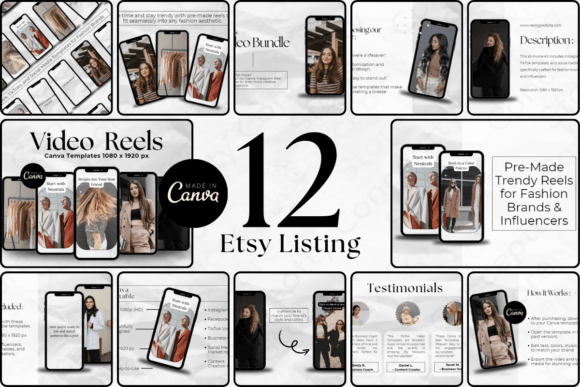
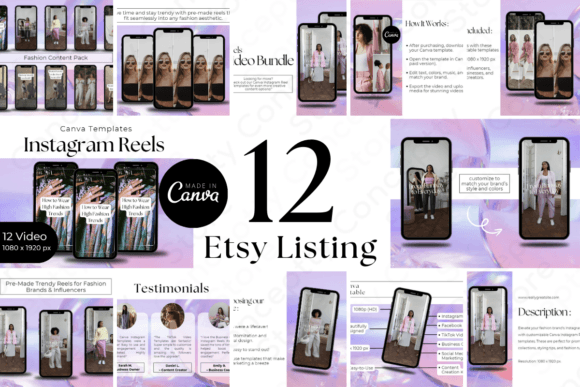
The related All-Purpose Etsy Listing Canva Template Stylish Trendy Reels for Fashion Brands extends this idea further by offering reel-optimized layouts for Instagram and Facebook. Sellers who actively market on social media may find value in using both templates together, maintaining visual continuity from the Etsy shop to social feeds.
Tradeoffs and Points to Weigh Carefully
No template suits every seller equally. A few considerations can help determine whether the V.6 template aligns with specific goals or whether another approach might serve better.
Template Dependency and Originality
Because Canva templates are accessible to many users, there is a possibility that other sellers in the same category may use identical or similar layouts. While the seller’s own photos, colors, and fonts will differentiate the final result, the underlying structure may not feel entirely unique. Sellers in highly saturated niches might prefer custom-designed assets or at least heavily modify the template to stand apart.
Learning Curve Within Canva
Although Canva is widely considered beginner-friendly, sellers who are brand new to the platform may still need time to learn how to replace images, edit text blocks, and navigate layer arrangements. The template is user-friendly, but comfort with Canva’s interface influences how quickly someone can produce polished results.
Twelve Pages May Feel Limiting or Excessive
For sellers with simple products that need only a few listing images, twelve pages might feel like more than necessary. Conversely, shops with highly complex products might wish for additional layout variety beyond the twelve. Assessing how many distinct image slots a typical product requires can clarify whether the page count matches actual needs.
File Management and Organization
Working with a multi-page Canva file means keeping track of different versions for different products. Without a clear naming and duplication system, a seller’s Canva dashboard can become cluttered. This is a workflow consideration rather than a template flaw, but it can affect daily efficiency.
When Alternatives May Be Worth Exploring
There are situations where the 12-Page Etsy Listing Canva Template V.6 may not be the most practical choice. Recognizing these can save time and frustration.
Sellers whose brand identity leans toward bold, maximalist, or heavily illustrative styles may find the neutral minimalist aesthetic too restrained. In that case, templates with more expressive typography, vibrant color block layouts, or hand-drawn elements could feel more aligned with the brand voice.
Those who prefer working outside Canva entirely, perhaps in Adobe Photoshop, Illustrator, or Figma, will need a different file format. While Canva supports some export flexibility, the native editing experience is tied to the platform. A seller deeply embedded in Adobe’s ecosystem might look for PSD or AI template alternatives instead.
Shops that primarily sell through video-first platforms may get more mileage from templates designed specifically for short-form video content. The companion reel template addresses part of this, but sellers focused exclusively on TikTok or YouTube Shorts might prioritize motion graphic templates over static listing images.
Practical Steps Before Committing
Taking a few preparatory actions can help a seller decide whether this template set fits their workflow and visual direction.
- Audit existing product photos. Check whether the majority of images work well in landscape orientation. If most photos are square or vertical, test how they look when cropped or placed into a horizontal frame.
- Define the listing story. Outline the key messages each product listing needs to convey. Compare that outline against the twelve available page types to see if there are gaps or unused layouts.
- Review brand guidelines. Confirm whether the template’s neutral color scheme and typography complement or clash with established brand elements. Canva allows customization, but starting from a compatible base reduces editing effort.
- Consider the full marketing picture. If social media reels are part of the strategy, evaluate the companion Instagram and Facebook-ready template at the same time. Coordinating both from the start can create a stronger cross-platform presence.
Balancing Efficiency With Authenticity
One of the subtler challenges with any template is maintaining a genuine connection with shoppers. Templates speed up production, but listings still need a human touch. Product descriptions written in the seller’s voice, authentic customer photos, and honest details about materials or sourcing add warmth that no layout alone can provide. The template works best as a structural foundation, not as a complete substitute for thoughtful presentation.
Sellers who customize each page carefully, adjusting spacing, swapping icon styles, and tailoring infographic elements to match the product, tend to see better engagement than those who drop in content without refinement. The time invested in small customizations often pays off in how trustworthy and professional the listing appears.
Assessing Long-Term Value
A template’s worth depends not just on the immediate time it saves, but on how well it adapts as a shop grows. The V.6 template can serve as a reusable asset across dozens or even hundreds of listings, provided the shop’s visual direction remains relatively stable. If a seller plans to rebrand or shift product categories significantly, the template may still work, but the neutral foundation gives some flexibility for color and font updates without rebuilding everything.
For new shops testing product-market fit, starting with a structured template can reduce decision fatigue and let the seller focus more on product quality, customer service, and marketing. For established shops, the template might fill gaps where custom-designed assets do not yet exist or serve as a backup for quick seasonal promotions.
Ultimately, the decision to use the 12-Page Etsy Listing Canva Template V.6 hinges on whether its landscape format, minimalist style, and twelve-page structure align with the seller’s products, photography, and brand personality. For those who value cohesion, efficiency, and a clean visual language, it represents a practical tool. For sellers whose needs lean in a different direction, understanding those differences makes it easier to find or build a solution that fits better.