Hospital Clinic Medical Service Vector Illustrations
Every medical or healthcare project needs a visual language that speaks calmly, clearly, and with authority. Whether you're designing a clinic's website, building a patient education app, or illustrating a wellness infographic, the smallest graphic can shape how people perceive care, professionalism, and trust. The Hospital Clinic Medical Service Vector collection steps into exactly that space — offering clean, meticulously crafted icons and scenes that adapt to your message, not the other way around.
This isn't just another clip art bundle. It's a thoughtfully assembled set of three distinct illustration variations, each delivered in AI, EPS, and JPG formats. The files are structured for both Mac and Windows users, with layers you can easily pick apart and recolor. Instead of wrestling with rigid graphics, you get a foundation that bends toward your creative needs. From a quick social post to a multi-page report, these vectors fit in without forcing you to compromise on detail or clarity.
What Makes These Vector Illustrations Special
At first glance, many stock graphics look polished but break down the moment you need to edit them. That’s where the real difference lies. The Hospital Clinic Medical Service Vector package comes with an internal organization that respects your time. Every file, every layer, and every shape is named and grouped so you can locate a syringe icon or a patient care scene in seconds — not after a frustrating search through unnamed Layer 47.
Here’s what sets this collection apart in daily practice:
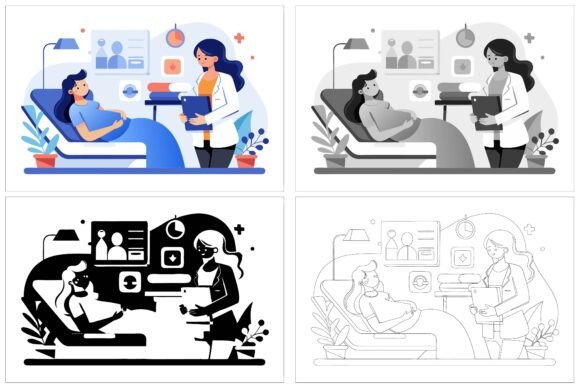
- Three cohesive variations – You get different styles or compositional arrangements within the same medical theme, so you can maintain visual consistency across a campaign while varying specific imagery for blog posts, emails, and landing pages.
- AI and EPS source files – Scalable vector formats mean you never lose fidelity. Enlarge a heartbeat line or a hospital building silhouette to billboard size, and every edge remains razor-sharp. The JPG versions provide ready-to-use alternatives when you need a quick raster placeholder.
- Cross-platform compatibility – Whether your team uses Adobe Illustrator on a Mac or CorelDRAW on Windows, the file structure behaves predictably. No more missing fonts or broken masks.
- Perfection in the details – Subtle gradients, consistent line weights, and proportionate negative space keep each illustration readable even at small icon sizes. A stethoscope doesn’t become a muddy blob when scaled down; a clinic building stays recognizable on a mobile screen.
- Editable down to the core – Colors, stroke widths, and individual elements can be modified with a few clicks. Need to align with a brand palette that uses teal and warm gray instead of classic blue? You can do that without starting from scratch.
That level of control matters especially for small business owners, freelance designers, and educators who often wear multiple hats. You don’t need to be an advanced illustrator to reshape these assets into something that looks custom-made.
Who Benefits Most from These Medical Vectors
While the collection clearly speaks to graphic designers, its reach extends much further. Think about the content marketer at a health-tech startup who needs on-brand visuals for a series of explainer articles. Or the medical educator building a presentation on patient flow in a clinic. Their skill sets differ, yet both require precise imagery that communicates complex ideas without overwhelming the viewer.
The Hospital Clinic Medical Service Vector set serves professionals across a wide spectrum:
- Healthcare providers and clinics – Use the illustrations to craft welcome signage, appointment reminder graphics, or website icons that feel less cold than generic stock photos. A simple vector of a doctor with a patient can soften the first impression of an online booking system.
- App and UX designers – Import the EPS files into Sketch or Figma to prototype health-tracking dashboards, symptom checker flows, or telemedicine interfaces. Because the vectors are neatly layered, you can isolate symbols — a heartbeat, a cross, a medication bottle — and test them as navigation icons.
- Print designers and publishers – Brochures, annual reports, and magazine spreads gain a polished, professional look when medical illustrations match the typography and layout. The high-resolution output keeps details crisp even on coated paper.
- Educators and e-learning developers – Build course materials that illustrate body systems, clinic environments, or hygiene practices. By changing colors, you can highlight specific areas for emphasis, drawing a student’s eye exactly where it’s needed.
- Bloggers and content creators – A post about health tips or clinic services feels more relatable when it includes a custom-feeling graphic rather than the same overused stock image everyone else uses.
The unifying thread is this: you’re not just buying pictures; you’re gaining a visual vocabulary that you can mold to fit your unique audience, platform, and tone.
Ideas for Real-World Projects
To understand the versatility of these vectors, it helps to walk through a few concrete scenarios. One designer used the collection to rebrand a small dental clinic. She took the base illustration of a medical consultation, swapped the generic doctor-and-patient pose with a dental chair silhouette from another variation, and recolored everything to match the clinic’s mint-and-charcoal palette. The result appeared on business cards, a website hero section, and interior clinic signage — all looking like part of an intentional family.
Another user, a health and wellness blogger, needed a set of icons for a 30-day self-care challenge. She extracted individual elements from the layered AI files — a calendar, a water glass, a resting figure — and placed them into her email sequence. Subscribers started clicking through more consistently because the visual cues reinforced the daily action item without adding clutter.
In a corporate setting, a publishing team incorporated the vectors into an infographic about patient wait times. By keeping the illustration style consistent across all data points, they made the statistical information more approachable. The ability to recolor segments meant they could use a traffic-light system: green for short waits, yellow for moderate, red for long delays, all within the same family of illustrations.
These examples share a common lesson: start with a clear communication goal, then use the editable nature of the vectors to support that goal rather than distract from it. The three variations give you enough range to differentiate between a clinic’s general services page, its pediatric unit, and its telemedicine offerings — without ever forcing a visual disconnect.
Editable and Adaptable: Tailoring Without the Headache
One of the quieter frustrations in design is receiving a “fully editable” file that requires you to ungroup 150 objects just to change a blue circle to green. The Hospital Clinic Medical Service Vector collection avoids that pitfall with a logical, well-named layer structure. Want to adjust the skin tone of a character? You’ll likely find a dedicated layer for skin fills. Need to remove a background detail for a cleaner icon? Toggle the layer visibility instead of painstakingly deleting anchor points.
Recoloring is equally straightforward. Select a global color in the AI file, pick a new hue from your brand swatches, and watch it ripple across every instance of that color in the illustration. For designers who work with accessibility in mind, this makes it simple to test high-contrast versions or color-blind-safe palettes before exporting final assets.
Beyond color, you can combine elements across the three variations. Maybe you love the ambulance from one scene and the clinic exterior from another. Copy and paste between files, scale as needed, and you’ve built a composite illustration that still feels cohesive because the line quality and rendering style match perfectly. This modular approach extends the collection’s lifespan — you can keep remixing long after the initial download.
Keeping Your Results Clear and Audience-Friendly
Having a beautiful set of vectors is one thing; using them effectively is another. Overloading a slide or a webpage with too many detailed illustrations can confuse rather than clarify. Here are a few practical recommendations to help your work stay sharp and user-centered:
- Assign a clear role to each graphic – If an illustration is meant to guide attention, let it breathe with plenty of negative space. If it’s a supporting icon, keep it small and aligned with the text it accompanies.
- Maintain consistency across touchpoints – Pick one illustration style (or a defined combination) for a campaign and stick with it. A clinic website that mixes highly rendered drawings with flat icons risks looking disorganized.
- Consider cultural and contextual nuances – A medical scene that feels appropriate in one region may seem off-putting in another. Because you can edit the vectors, you can swap symbols, adjust uniforms, or modify gestures to fit local expectations.
- Test across devices and formats – What looks crisp on a 27-inch monitor may become indistinct on a phone screen. Preview your adaptations at multiple sizes and, if needed, simplify overly intricate sections for smaller displays.
- Pair with clean typography – Medical content already carries cognitive load. Let readable fonts and a calm color scheme support the illustrations, rather than competing for attention.
These habits ensure that the attention you invest in editing the vectors pays off in audience trust. When a graphic feels thoughtfully chosen rather than hastily pasted, your credibility rises — whether you’re a freelance designer presenting a client pitch or a health educator sharing tips on social media.
Why the File Variety Matters for Multi-Platform Work
Modern projects rarely live on a single medium. A clinic might use the same visual identity on a printed flyer, a Facebook post, a YouTube thumbnail, and an in-office digital screen. Each platform has different resolution demands and color profiles. The Hospital Clinic Medical Service Vector collection anticipates this by including both vector formats — which scale infinitely — and high-quality JPGs for quick placement.
For web designers, EPS files open cleanly in virtually any professional vector software, while AI files keep layers fully intact for Adobe users. If you’re handing off assets to a developer, you can export PNGs or SVGs at exactly the right dimensions. And if a stakeholder just needs to drop an image into a PowerPoint slide, the JPG is there, ready to go without any conversion steps.
Print designers especially appreciate the control over spot colors and overprint settings that vector files provide. When a hospital branding guide specifies exact PMS colors, you can apply them precisely. For large-format prints — think a waiting room mural or a clinic banner — the artwork won’t pixelate or soften, keeping that professional edge even at close viewing distances.
Getting Started Without Overwhelm
Sometimes a creative toolkit feels more like a burden when you first open the folder and see numerous files. Start small. Identify the primary project that needs a medical illustration, then open the AI file that feels closest to your vision. Spend a few minutes clicking through the layers to understand the structure. Experiment with replacing one global color. Export a test JPG and drop it into your layout. That small win builds momentum.
From there, you can expand. Combine elements, create monochromatic icon sets for an app, or build a reusable library of branded medical illustrations that your whole team can access. Because the basics are already handled — neat organization, cross-platform compatibility, and detailed renders — you can focus on what your specific audience values most.
The collection acts as a springboard, not a cage. You aren’t locked into a single style or expression. By mixing, customizing, and thoughtfully placing each illustration, you transform stock vectors into a distinctive visual toolkit that feels genuinely yours. For anyone working at the intersection of healthcare, design, and communication, that kind of flexibility is rare and genuinely productive.