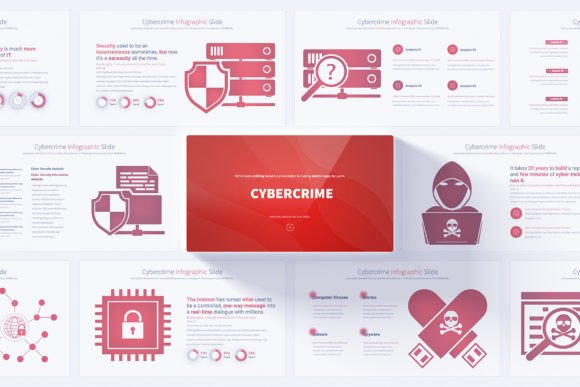
Cybercrime PowerPoint Template: A Practical Resource for Security Presentations
When you need to communicate complex cybersecurity concepts to stakeholders, clients, or internal teams, the quality of your visual aids can make or break the message. A scattered, inconsistent slide deck undermines credibility before you even begin speaking. The Cybercrime PowerPoint Template addresses this challenge directly, offering a structured collection of infographic slides built around a theme that many IT and security professionals grapple with daily. Rather than promising to solve all your presentation woes, let's examine what this template actually delivers and whether it fits your specific workflow.
What the Template Contains and Why Structure Matters
At its core, this downloadable resource provides 17 unique slide layouts that multiply into 204 total slides when you account for the 12 color variations included. That number deserves some unpacking, because it can be misleading if you are not familiar with how presentation templates are typically packaged. The 17 unique designs represent distinct visual frameworks—data comparison charts, process diagrams, threat assessment snapshots, and strategic roadmap layouts among them. Each of those 17 designs ships in 12 different color schemes on a light background, which brings you to 204 individual slide files.
The practical implication here is straightforward: you are not hunting through a mismatched assortment of styles when building a deck. Because everything originates from the same design family and uses the same Slide Master structure, you can mix slides from different color variations without the result looking disjointed. This matters more than many presenters realize. When your audience sees a consistent visual language from slide to slide, their cognitive load decreases, and they can focus on the content rather than subconsciously noting that the shade of blue changed between slide four and slide seven.
Slide Master Customization and Why It Saves Time
One of the more practical features mentioned in the item description is the Slide Master compatibility. For anyone who has spent hours manually adjusting font sizes, repositioning logos, or realigning text boxes across dozens of slides, the value here is immediate. With Slide Master editing, you modify the parent slide once, and those changes propagate to every child slide automatically. This means you can swap out placeholder text, adjust your brand colors, or reposition a recurring graphic element in minutes rather than hours.
The Cybercrime PowerPoint Template leans heavily on this functionality, which suggests the designers understand how professionals actually use such resources. Most users will not keep the default color palette or placeholder content. They will need to inject their company's visual identity, specific data points, and tailored messaging. The template's architecture supports this without requiring you to fight against locked elements or poorly grouped objects that break apart when you try to move them.
Editable Vector Icons as a Flexible Asset
Beyond the slides themselves, the inclusion of 280 fully editable vector icons extends the template's usefulness beyond cybersecurity-specific presentations. Vector icons scale without degradation, so you can enlarge a shield icon for a title slide or shrink a lock symbol for a bullet point without pixelation. Because they are editable, you can recolor them to match your brand palette, combine elements to create new visual metaphors, or extract individual icons for use in other documents, reports, or social media graphics.
This transforms the template from a single-purpose presentation tool into a modest icon library that can support broader visual communication efforts. For small business owners or freelancers who handle their own marketing and design, having a cohesive set of security-themed icons readily available eliminates the need to source, license, and verify the quality of individual icon files from disparate sources.
Animation and Visual Engagement Without Overwhelm
Animated transitions are listed among the features, and it is worth discussing what that means in practice. Each slide comes with pre-built animations applied to elements like text blocks, infographic components, and icons. The benefit here is twofold. First, you avoid the time-consuming process of sequencing animations from scratch, which can eat up hours if you are particular about timing and order. Second, the animations are designed to be subtle enough for professional settings—these are not the spinning, bouncing, or swooping effects that make corporate audiences cringe.
That said, animations are always optional. The template does not bake them in as irreversible elements. You can disable, modify, or replace transitions with a few clicks. For presenters who prefer static slides or who will export the deck to PDF for distribution, the animation layer simply becomes inactive. There is no penalty or degradation in quality when animations are turned off, which is a thoughtful design choice that accommodates different delivery contexts.
Who Benefits Most from This Template
The audience for the Cybercrime PowerPoint Template is broader than the cybersecurity niche alone, though security professionals are the obvious primary users. Consider the following groups who might find practical value here:
- Cybersecurity consultants and analysts who present threat assessments, vulnerability reports, or incident response plans to clients and need visuals that reinforce their technical expertise without overwhelming non-technical stakeholders.
- IT managers and directors who pitch budget allocations, infrastructure upgrades, or security policy changes to executive leadership and require slides that balance technical accuracy with boardroom clarity.
- Compliance officers and data protection specialists who explain regulatory requirements like GDPR, HIPAA, or PCI DSS to cross-functional teams and benefit from diagrams that translate legal obligations into understandable workflows.
- Educators and corporate trainers who deliver cybersecurity awareness programs and need consistent, visually engaging materials that hold learner attention across multiple sessions.
- Small business owners who lack dedicated design resources but must occasionally present security strategies to partners, investors, or employees and want a polished result without outsourcing to a designer.
Each of these use cases demands slightly different things from a template. The consultant needs flexibility to insert client-specific data. The trainer needs clarity and repetition of key concepts. The small business owner needs simplicity and professional polish. The Cybercrime PowerPoint Template addresses these varied needs through its breadth of slide types and customization options, though some assembly and tailoring will always be required—no template will automatically generate a compelling narrative or fill in your specific statistics.
Handmade Infographics and the Quality Perception
The product description emphasizes handmade cybercrime and security infographics, which raises an interesting point about presentation design. Stock templates often suffer from a generic, assembly-line feel where graphics look like they were generated algorithmically rather than crafted with intent. Handmade infographics, by contrast, tend to demonstrate more thoughtful composition, better spatial relationships between elements, and visual metaphors that actually align with the content they are meant to represent.
In practice, this manifests in slides where a data breach flow diagram does not just present arrows in a line but uses visual hierarchy to emphasize critical nodes, or where a risk assessment matrix uses color and iconography to make threat levels immediately scannable. The difference can be subtle, but audiences notice it subconsciously. Slides that feel crafted rather than packaged contribute to a presenter's perceived authority and preparedness.
16:9 Full HD Resolution and Modern Display Compatibility
The template's 1920x1080 pixel resolution in a 16:9 aspect ratio aligns with current presentation standards. Most modern projectors, monitors, and conference room displays operate natively at this resolution. Using slides designed for this format eliminates the black bars, awkward cropping, or resolution mismatches that plague decks built in older 4:3 formats.
This is particularly relevant for cybersecurity presentations, which often take place in varied environments—from formal boardrooms with high-end AV systems to impromptu laptop huddles in server rooms. The template's Full HD foundation ensures your visuals render crisply regardless of the display context, provided you export or present at the intended resolution.
Practical Limitations to Keep in Mind
No evaluation is complete without acknowledging where a resource falls short or requires additional effort. The Cybercrime PowerPoint Template functions within Microsoft PowerPoint's PPTX format, which means users working in Google Slides, Keynote, or other presentation software will need to import and potentially adjust elements. PowerPoint-to-Google Slides imports have improved significantly, but occasional formatting shifts—especially around custom fonts or complex animations—can still occur.
Additionally, while 17 unique slide layouts provide a solid foundation, presenters with highly specialized data visualization needs—such as interactive network topology maps or real-time threat dashboards—may find the static infographic approach insufficient and will need to supplement with screenshots, embedded tools, or custom graphics.
The light background color scheme, available in 12 variations, creates a clean and accessible aesthetic. However, presenters who strongly prefer dark mode or darker slide backgrounds for specific environments may need to manually adjust background colors, which can affect the visibility and contrast of certain infographic elements. This is not a flaw so much as a design choice that prioritizes readability and print-friendliness over the darker aesthetic that some technical audiences favor.
Integrating the Template into Your Workflow
Getting the most from this resource requires more than downloading and opening the file. A practical approach involves several steps. Start by reviewing all 17 unique layouts to understand what is available—resist the urge to begin customizing the first slide you see. Identify which color variation aligns closest with your brand or the tone of your presentation. Use the Slide Master to apply your logo, preferred fonts, and any recurring design elements across all slides at once.
Then, select the specific slides that support your narrative. Not every presentation will use all 17 layouts, and that is fine—the remaining slides serve as a library for future projects. Populate the chosen slides with your actual data, adjusting the editable vector icons and infographic elements as needed. Test the animations in slideshow mode to confirm timing and flow feel natural, and consider creating a static PDF version for distribution after the live presentation.
Documentation and Support Considerations
The inclusion of PDF documentation is a small but meaningful addition. Documentation typically covers installation guidance, an overview of slide layouts, customization instructions, and troubleshooting tips for common issues. For users who are not deeply familiar with PowerPoint's advanced features, this documentation can significantly reduce the learning curve and prevent the frustration of discovering features late or making unnecessary mistakes during customization.
The user-friendly label in the product description suggests that the designers have prioritized accessibility, but as with any template, individual experience will vary based on technical comfort with presentation software. A complete novice may still need to invest time learning the basics of PowerPoint before the template's full capabilities become accessible, while an experienced user will likely find the workflow intuitive and efficient.
Ultimately, the Cybercrime PowerPoint Template functions as a structured starting point rather than a finished product. It provides the visual framework, consistency, and design quality that allow security professionals and business presenters to focus on what they do best: crafting compelling arguments, interpreting data for their specific audiences, and delivering messages that drive informed decisions. For those who regularly present on cybersecurity topics and want to elevate their visual communication without a steep learning curve or design outsourcing costs, this template represents a practical addition to their professional toolkit.