What Actually Makes the Content Sharing Icon Pack a Useful Asset for Everyday Projects
When you’re assembling a website mockup, putting together a quarterly report, or sketching out an app interface, the visual shortcuts you choose can either clarify your message or add unnecessary noise. The Content Sharing Icon Pack is one of those quiet workhorses that often gets more attention in practice than in theory. It doesn’t promise to revolutionize design, but after spending time with the set, it becomes clear why a well-curated collection of this kind fills a gap for many professionals.
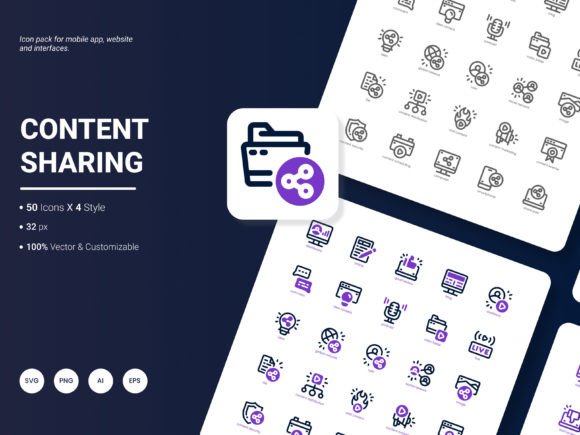
This pack bundles 200 icons that center on content sharing, popular online services, and abstract communication concepts. Instead of hunting across scattered free repositories or licensing individual assets, you get a cohesive visual system in one download. The themes stretch from familiar social media logos to broader metaphors for collaboration, analytics, creativity, and distribution. That range alone makes it a candidate for more than just one-off use. It can sit inside a design library and be reached for repeatedly across presentations, templates, and client projects.
What Kinds of Icons You’re Actually Getting
The collection doesn’t only cover the expected roundup of platform logos, though those are certainly present. You’ll find recognizable marks for services like Instagram, Facebook, LinkedIn, YouTube, Pinterest, and X (formerly Twitter), rendered in a consistent style. But alongside those, the pack ventures into conceptual territory: an icon representing a content calendar, a share node, a group collaboration symbol, data visualization cues, and various infographic-style markers.
This blend of concrete and abstract is where many icon packs fall short. If a set includes only brand icons, you eventually have to break visual consistency when you need a generic “upload” or “engagement” icon. The Content Sharing Icon Pack avoids that problem by treating the entire content sharing ecosystem as its subject, not just the platforms. For someone who regularly creates decks about social strategy or writes blog posts with embedded graphics, that means less time substituting mismatched symbols.
Four Visual Styles for Different Contexts
Not all interfaces tolerate the same stroke weight or fill style. This pack includes four distinct visual treatments, which gives you some breathing room when moving between a dark-mode dashboard, a minimalist landing page, and a brightly colored marketing flyer. While the exact style names vary depending on how you categorize them, you can expect a spectrum that likely covers outline, solid, flat, and a more stylized colored version.
Having multiple renditions of the same icon sounds like a minor detail until you’re trying to keep buttons, navigation labels, and infographic callouts visually aligned. A 2px stroke outline icon might look perfect next to thin sans-serif text, but it can vanish on a busy photo background. The solid or colored variant can step in without forcing you to alter the icon’s silhouette or meaning. This design consistency across styles means that even a non-designer can pick the appropriate variation without agonizing over readability.
File Formats and What They Mean for Real Workflows
A truly practical icon pack shows its value not just in the number of assets, but in how easily those assets fit into your existing tools. The Content Sharing Icon Pack arrives in six formats: AI, EPS, SVG, PNG, PDF, and JPG. That selection covers most of the ground a typical creative, marketing, or business user will walk on.
Vector formats like AI, EPS, and SVG give you full editing control. You can open them in Adobe Illustrator, Figma, Sketch, or Affinity Designer and tweak stroke widths, recolor paths, or simplify shapes without quality loss. This is where the pack’s editability becomes a real asset. If your brand palette uses a specific teal instead of the default blue, or you need to align icon line weights with your custom UI kit, vector files make that possible in minutes.
Raster formats—PNG and JPG—cater to users who don’t have vector software at hand or who need a quick drop-in for a PowerPoint slide or Canva project. The PDF format is particularly useful for documentation, where you might embed an icon without worrying about image resolution at different print scales. In practice, the PNGs at high resolution (often 512px or larger) serve most digital needs without visible pixelation, while JPGs can work in a pinch when file size is a concern, though they lack transparency.
An often-overlooked benefit is that having SVG and PNG alongside each other streamlines collaboration. A developer can take the SVG and implement it directly in code, while a content manager grabs the PNG for the blog CMS. No conversion step required, which reduces the minor friction that accumulates across dozens of assets.
Where This Icon Set Performs Well in Practice
The real test of any design resource is whether it gets used repeatedly or just admired. Based on the structure of this pack, there are several practical scenarios where it’s likely to earn its keep.
Website and Application Design
For UI designers, every pixel counts. Icons need to be crisp at 16px and still recognizable at larger sizes inside hero sections or feature tiles. Because the Content Sharing Icon Pack includes vector sources, you can scale any icon to the exact dimensions your grid demands and export it at 1x, 2x, and 3x resolutions without fuzzy edges. The variety of styles also means you can create a stable hover state by swapping an outline icon for a solid version on rollover, a subtle interaction that requires zero new design effort.
Presentations and Analytical Reports
Management consultants, marketing analysts, and startup founders often spend too much time searching for icons that don’t look like generic clip art. Using icons from this pack inside a presentation deck or a PDF report instantly lifts the perceived polish, especially when the same set appears on multiple slides. Because the icons already reflect themes around sharing, growth, and communication, they map naturally to business metrics without feeling forced. You can place a stylized “share” icon next to a viral coefficient stat, or use a “network” icon to introduce a partnership slide, and the visual logic holds.
Infographics and Educational Content
Infographics thrive on visual shorthand. The pack’s conceptual icons—think speech bubbles, connection nodes, megaphones, and layered document symbols—help an educator or blogger translate paragraphs of text into scannable visual steps. Even more important, the consistency across all 200 icons means you won’t inadvertently create a jarring mismatch when you combine a “calendar” icon with a “target” icon in the same graphic. That visual uniformity is what separates a professional infographic from something that looks assembled from five different free packs.
Where the Pack Shows Restraint and Where It Could Stretch Further
No icon set covers every conceivable need, and the Content Sharing Icon Pack is wisely focused rather than trying to be a universal library. That focus is a strength for its target use cases, but it also suggests some boundaries.
Strengths: The icons are recognizably on-trend without being so stylistically aggressive that they’ll date in six months. The line thicknesses are balanced, the corner radii are moderate, and the overall language leans toward a friendly professional tone. Editing the vector files is straightforward; there are no overly complex compound paths that break when ungrouped, which can happen in less carefully prepared sets. The inclusion of PDF as a format signals an awareness that not all users live inside design software—many just need a clean icon to drop into a proposal template.
Practical limitations: Because the pack focuses on content sharing, it won’t help you much with niche e-commerce symbols, specific industry icons, or highly technical diagram elements. If you need a medical device icon or a detailed architectural symbol, you’ll still need another resource. Also, while four styles are provided, they may not cover every interface requirement; a dedicated line-duotone style or a true glassmorphism set would require extra customization on your part. Raster formats like JPG lose transparency, which can surprise new users who import a JPG into a slide and find a white box around the icon. That’s easily solved by using PNG instead, but it’s worth noting.
The pack also relies on the user having at least a basic understanding of how to handle vector files if full editing is needed. For total beginners, the flat PNGs may be all they ever use, which means they’re not tapping into the true flexibility of the icon set. That’s more a user knowledge gap than a product flaw, but it’s a realistic part of the experience.
Who Gets the Most Mileage Out of This Collection
Given its subject and format range, the Content Sharing Icon Pack serves a surprisingly broad audience, but a few profiles stand out.
- Freelance marketers and social media managers: They constantly produce assets for posts, ads, and reports. Having a unified set of content-related icons saves them from the visual patchwork that undermines brand presentation.
- Small business owners and entrepreneurs: Those who build their own landing pages or pitch decks benefit from fast, professional icons without a monthly subscription.
- Web designers and front-end developers: SVG files enable direct implementation and animation possibilities, while maintaining a single visual family across a project.
- Educators and bloggers: When explaining concepts like digital content distribution or audience growth, consistent icons make complex workflows easier to grasp.
- Presentation specialists and consultants: They need variety without visual chaos; the multi-style approach lets them adapt icons to different slide masters without disrupting harmony.
Even serious hobbyists who run meetups, community newsletters, or YouTube channels can use the icons to create thumbnails, chapter markers, and printable resources that look considered rather than rushed.
What Might Make the Next Update Even More Useful
A common request from users of such packs is to expand the ecosystem around the core set. While the current selection of 200 icons is solid, future iterations could include more granular variations for emerging platforms, more inclusive avatars or team representations, and perhaps a small set of micro-animations in JSON or GIF format for those working on interactive projects.
Additional style variants like a softer duotone or an isometric interpretation of the same icons could open doors for pitch decks that demand a particular visual mood without requiring heavy manual editing. Also, basic documentation or a quick reference sheet that maps each icon to its keyword would speed up searching for users who dig through folders rather than using an icon manager.
Perhaps most practically, including a dark-mode optimized version of the outline style—where strokes are slightly thickened and lighter in color by default—would save UI designers an extra step when building for apps that live in dark environments.
Suggestions like these aren’t about making the pack bloated; they’re about helping it evolve into an even more indispensable tool for the people who rely on it daily. The core value is already there. Expanding thoughtfully would simply increase the number of projects where it can be the first—and only—icon set you reach for.
Whether you’re mocking up a new feature, finalizing a client deck, or assembling an educational graphic this week, the Content Sharing Icon Pack offers a dependable foundation. It doesn’t try to be everything to everyone, and that restraint is exactly why it earns a permanent place in a working designer’s or communicator’s toolkit. The combination of subject relevance, format range, style variety, and genuine editability gives it practical staying power beyond the initial download.